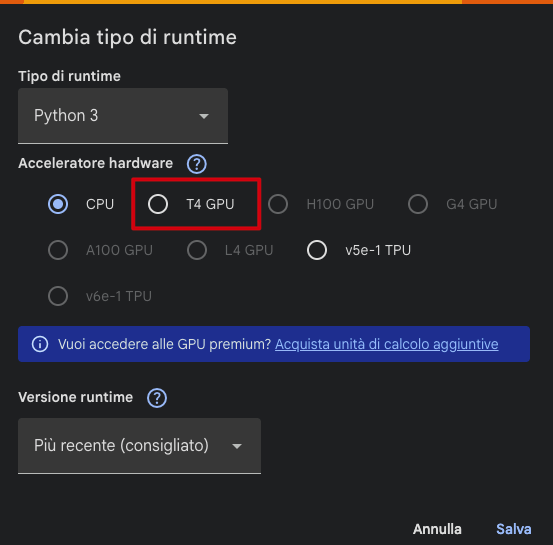
T4 GPU not always available on Colab

T4 GPU not always available on Colab

by LEONARDO PONTELLO -
Number of replies: 2

Hi everyone,

I wanted to bring up something that's been affecting our group: on Colab Free, the T4 GPU is not always assigned when you start a session. Sometimes you get CPU-only, which makes running the models either very slow or completely infeasible.

In our case, CPU is not even an option, the models we're using require more memory, so we need the T4.

Are you just retrying until you get a T4, scheduling runs at off-peak hours, or are you using smaller models?

Also, would it be fine to run the notebook locally instead of on Colab?

Any tips welcome.

In reply to LEONARDO PONTELLO

Re: T4 GPU not always available on Colab

by UMBERTO BIANCHIN -
Hi Leonardo,
you can manually choose the environment of your Colab session. You can click on the small arrow at the right of where yuo see "RAM, Disk" and then click on "Change type of runtime". Here you can choose the T4 GPU Environment.
 
I hope that is useful.
Change runtime
 
Change runtime type
 
In reply to UMBERTO BIANCHIN

Re: T4 GPU not always available on Colab

by LEONARDO PONTELLO -
Thank you for the answer.
The problem is that sometimes, If the T4 Cluster is already used by premium users this pupup appears:
WhatsApp%20Image%202026-06-09%20at%2012.47.42%20%281%29.jpeg